Get Started
Welcome to Canonicals! This guide will walk you through everything you need to start making predictions and earning rewards on the platform.
Quick Start Overview
Step 1          Step 2          Step 3          Step 4          Step 5
Connect    →    Deposit    →    Browse     →    Predict    →    Resolve
Wallet          Tokens          Markets         & Wait          Rewards distributed

⏱️ 1 min       ⏱️ 1 min       ⏱️ 3 min       ⏱️ Ongoing
Prerequisites
Before you begin, make sure you have:
1. Compatible Wallet
Option A: Web3Auth (Recommended for Beginners)
- ✅ Sign in with Google, Apple, Wechat or email
- ✅ No browser extension needed
- ✅ Built-in wallet creation
- ✅ User-friendly interface
- 🔗 Learn more about Web3Auth
Option B: External Wallet (For Advanced Users)
- MetaMask (most popular)
- WalletConnect compatible wallets
- Coinbase Wallet
- Trust Wallet
- Any EVM-compatible wallet
Don’t have a wallet? Choose Web3Auth during signup - it will create one for you automatically.
2. Supported Tokens
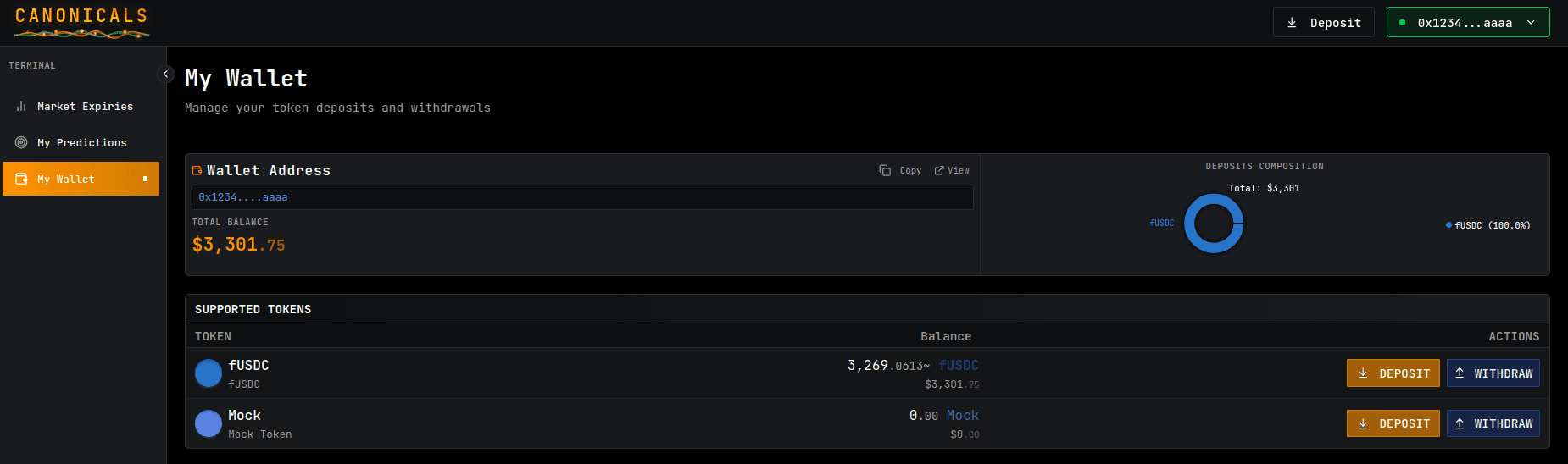
You’ll need one of the supported tokens on Canonicals to make predictions. Check the “Deposit” page for the complete list.
To start predicting, deposit your tokens into your Canonicals balance.
3. Browse Markets
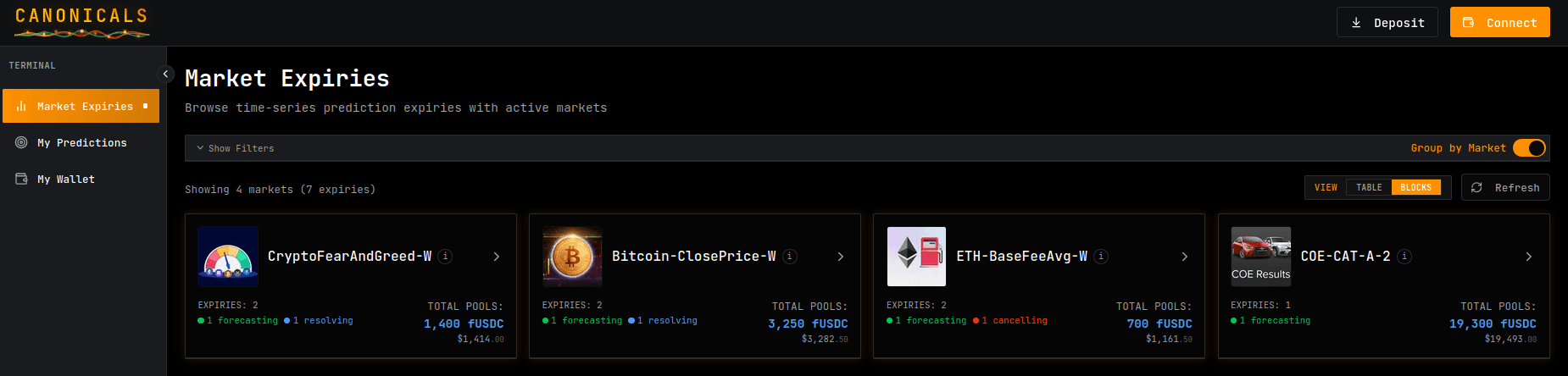
Go to “Markets” page
- Browse all available prediction markets
- Filter by category, verification status, or token
- Click on a market to explore
- See market description
- View available expiries
4. Make Your First Prediction
Understanding Expiries
Each market has multiple expiries - specific future dates when the real value will be revealed:
- Example: Bitcoin close Price might have expiries for March 27, April 3, May 10, etc.
- Each expiry is a separate prediction contest
Making a Prediction
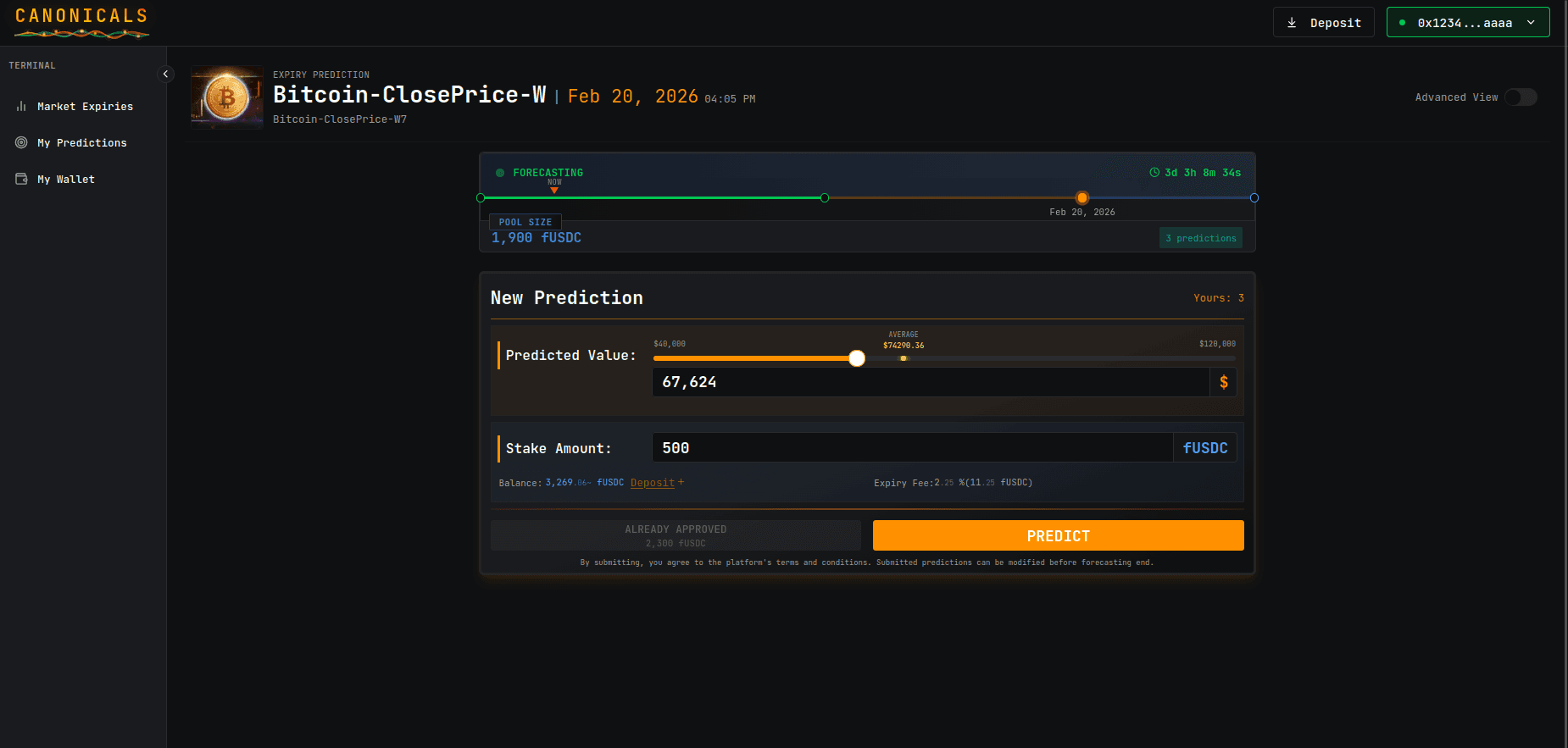
Simple mode
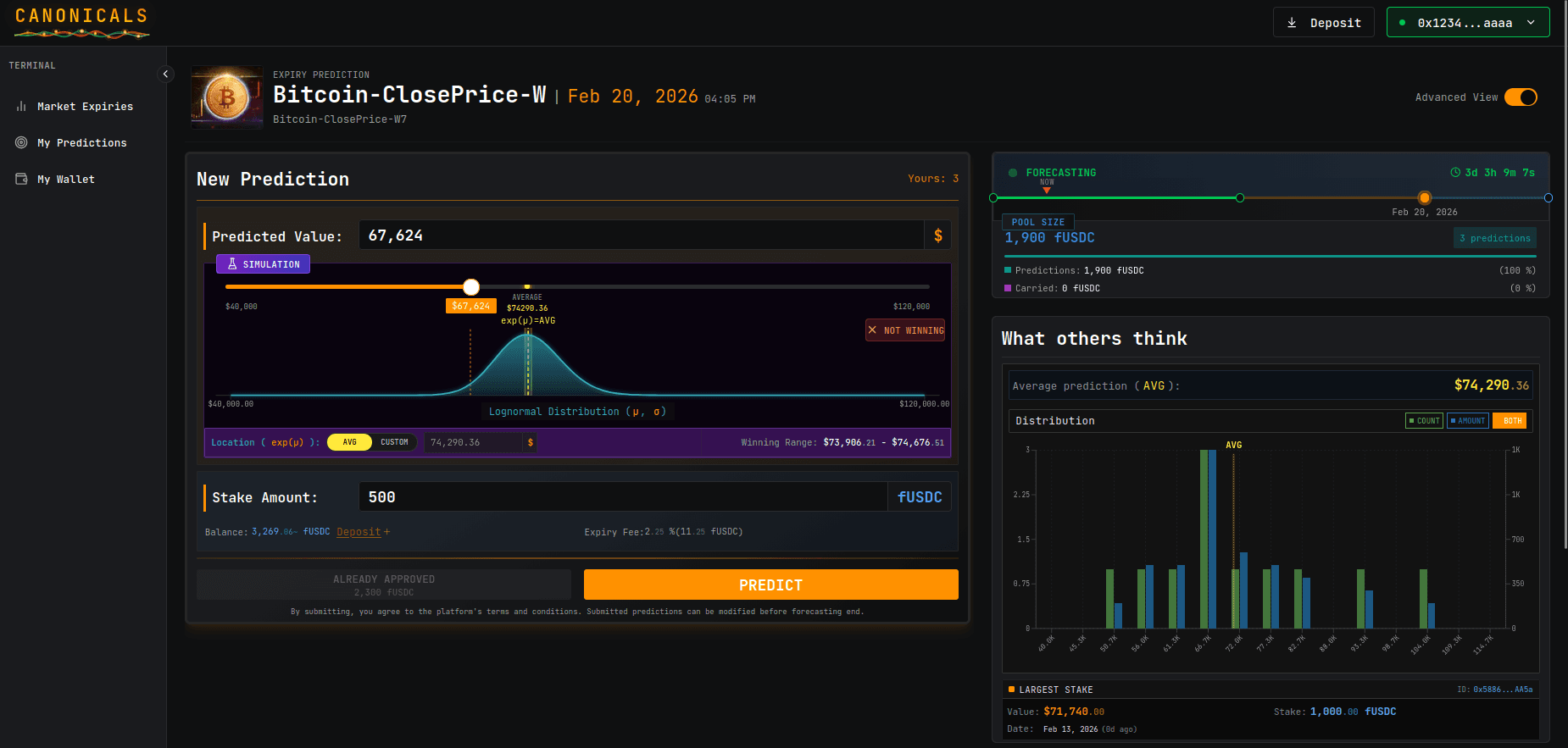
Advanced mode
-
Select an active expiry
- Click on the expiry date
- Check the stage: Must be “FORECASTING”
-
Review expiry details
- Expiry Time: When the value will be measured
- Start Time: When predictions began
- Current Stage: FORECASTING (accepting predictions)
- Time Remaining: How much time left to predict
- Current Predictions: How many people have predicted
-
Approve the expiry (first time only)
- Click “Approve Expiry”
- Enter approval amount (e.g., 100 USDC)
- Confirm transaction in wallet
- Wait for confirmation
-
Enter your prediction
- Predicted Value: What you think the actual value will be
- Stake Amount: How much you want to bet
Example:
Market: Bitcoin close Price Expiry: February 20, 2026 Your Prediction: - Value: $67.624 - Stake: 500 USDC -
Review the impact
- Time Factor: Earlier prediction = more error tolerance
- Error Tolerance: How far off you can be and still win
- Potential Reward: Estimated if you win (proportional to stake)
-
Submit prediction
- Click “Submit Prediction”
- Review transaction details
- Confirm in wallet
- Wait for confirmation
-
Track your predictions
- Go to “My Predictions” page
- See status, current stage, time to expiry
- Manage stake amounts during FORECASTING stage
Managing Your Predictions
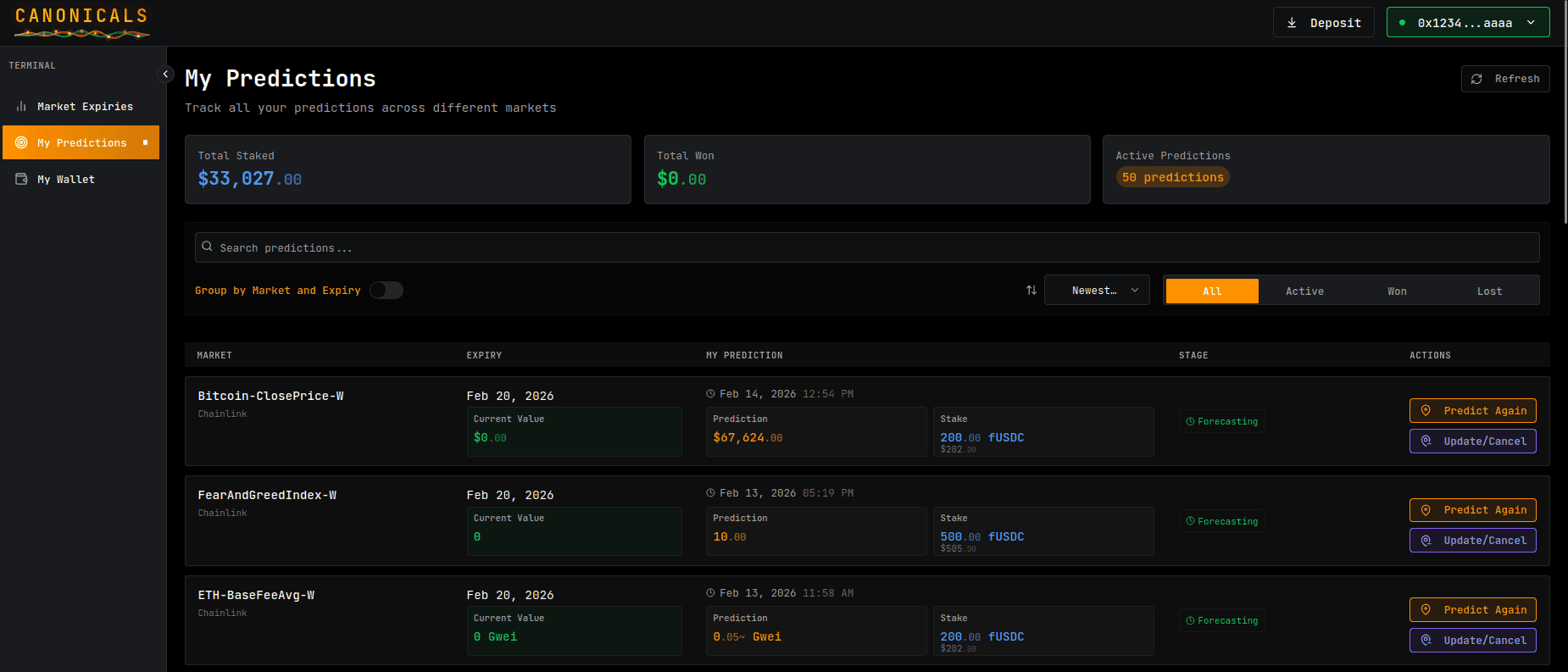
During the FORECASTING stage, you can manage your predictions:
Submit Multiple Predictions (Unlimited):
- ✅ Make as many predictions as you want per expiry
- ✅ Each prediction can have different values and stakes
- ✅ Each maintains its own timestamp (affects error tolerance)
- ✅ All winning predictions earn proportional rewards
Update Existing Predictions:
What You Can Update:
- ✅ Stake Amount: Decrease stake or withdraw all (cancel prediction)
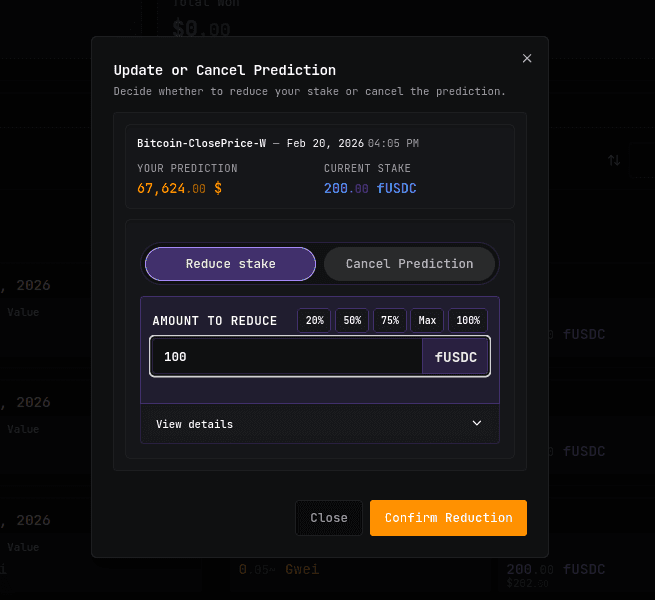
What You CANNOT Update:
- ❌ Cannot change the predicted value
- ❌ Cannot increase stake amount
To change value or add more stake: Submit a NEW prediction instead
Decreasing Stake / Withdrawing:
Options:
- Partial Withdrawal: Reduce stake amount (must remain ≥ minimum stake)
- Full Withdrawal: Remove entire stake (effectively cancels the prediction)
Effects:
Penalty Fee 💰:
- Fee charged on withdrawn amount
- Set by market creator during expiry creation
- Fee goes to carry pool
Important Notes:
- ✅ Original predicted value remains unchanged
- ✅ Original timestamp preserved (no reset)
- ✅ For partial withdrawal: Remaining stake must meet minimum requirement
- ❌ Cannot reactivate a fully withdrawn prediction
Strategy: Multiple Predictions vs Withdrawals
Want to increase your total stake? → ✅ Submit a NEW prediction with additional amount → ❌ Cannot add to existing prediction
Want to hedge your bets? → ✅ Submit multiple predictions at different values
Want to reduce risk? → ✅ Partially withdraw stake from existing prediction (penalty applies)
How to Decrease/Withdraw Stake:
- Go to “My Predictions” page
- Find the prediction you want to modify
- Click “Update/Cancel”
- Choose:
- “Reduce Stake” (enter amount to withdraw)
- “cancel prediction” (Withdraw All)
- Review:
- Withdrawal amount
- Penalty fee
- Amount you’ll receive back
- Confirm transaction
- Funds returned to your balance (minus penalty)
Pro Tips: 💡
- Submit multiple predictions to diversify (no penalty)
- Each prediction keeps its own timestamp advantage
- Only withdraw if you need to reduce risk
- Multiple winning predictions = larger share of prize pool
5. Wait for Resolution
After the expiry time passes:
-
Observation Period
- System waits for data to be available
- Status: OBSERVING
-
Resolution Period
- Anyone can trigger oracle request
- Chainlink fetches real-world data
- Status: RESOLVING
-
Winner Calculation (Automatic)
- System calculates winning range
- Identifies all winners
- Status: RESOLVED
-
Notification (if enabled)
- Email/app notification
- “Your prediction is resolved!”
What to do: Nothing! The system handles everything automatically.
Prediction Best Practices
Research:
- 📊 Study historical data and trends
- 📰 Read relevant news and analysis
- 📈 Understand market fundamentals
- 🔍 Check multiple sources
Risk Management:
- 💰 Only stake what you can afford to lose
- 📊 Diversify across multiple markets
- ⚖️ Balance stake sizes based on confidence
- 🎯 Start small and scale up gradually
Strategy:
- ⏰ Consider timing vs. accuracy tradeoff (earlier = more tolerance)
- 🔄 Submit multiple predictions instead of withdrawing to preserve timestamp advantages
- 💰 Withdraw stake if reducing risk (penalty applies)
- 📈 Diversify with predictions at different values
- 📉 Don’t chase losses
- 💡 Multiple winning predictions = larger share of prize pool